Blog
Why Is My iPhone Screen Black But It’s Still On?
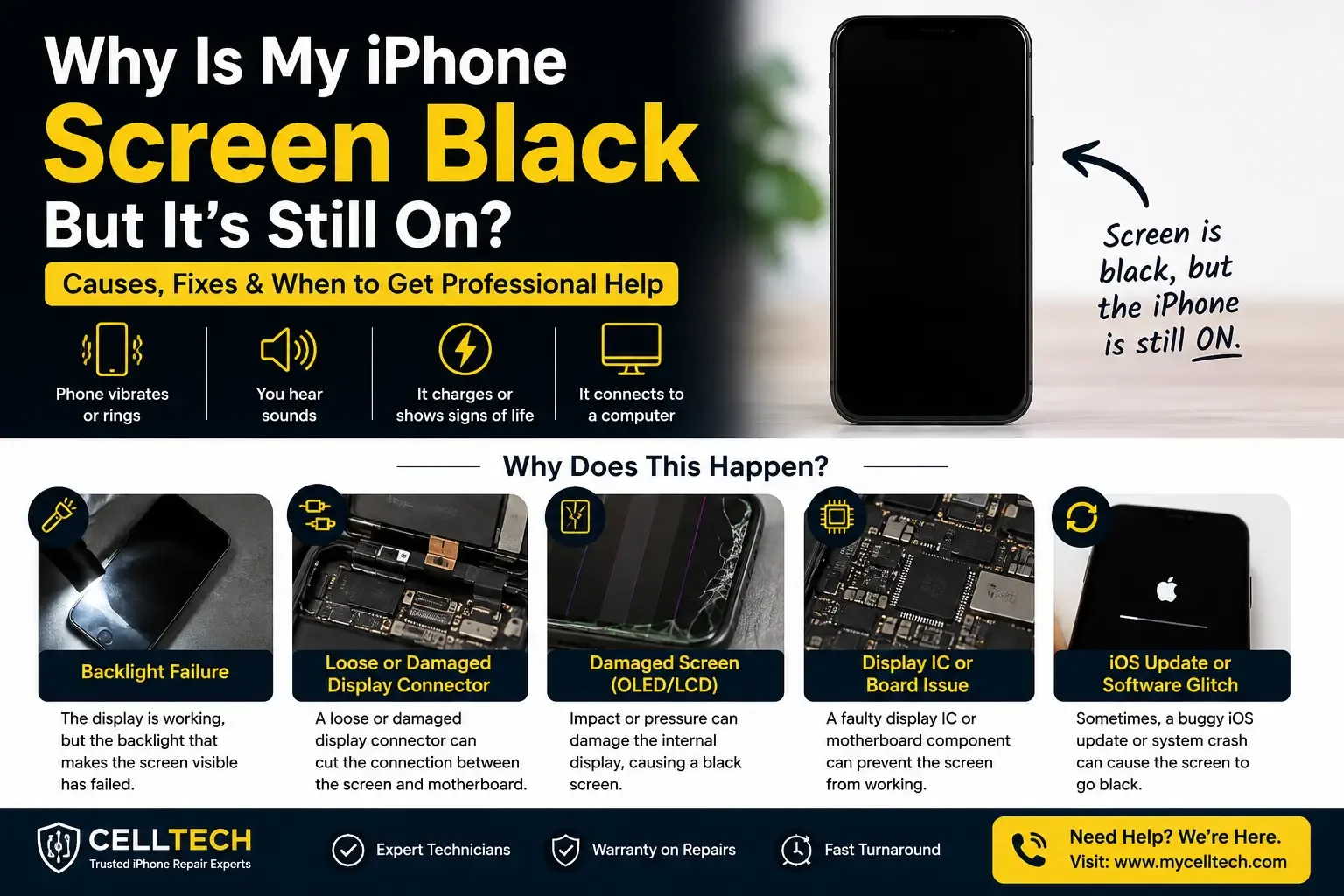
If your iPhone vibrates, rings, or responds to Siri but the screen stays black, the phone is running normally and only the display has failed. The most common causes are a software crash, a display connector knocked loose by a drop, a dead backlight, or a failed screen from an earlier repair. Start with a force restart it fixes a large share of cases in under a minute.
First: Confirm Your iPhone Is Actually Still On
This matters, because a phone that’s genuinely powered off is a completely different problem with a different fix.
Run through this list. Any single “yes” means your iPhone is running and the display is the problem:
- Call your number from another phone — does it ring or buzz?
- Say “Hey Siri” — does she answer from a dark screen?
- Plug in the charger — do you hear the charging chime?
- Flip the ring/silent switch — do you feel the haptic click?
- Connect it to a computer — does the Mac or PC detect it?
- Rest your hand on the back after 10 minutes — is it warm?
If you got a yes to any of those, here’s the good news: your logic board, your storage chip, and every photo on the device are fine. Only the window you look through has failed.
If you got no response to any of them, your problem is more likely a dead battery or a power fault, a different diagnosis, and one worth bringing in for a free check.
The 3 Fixes Worth Trying at Home (Free, Safe, 10 Minutes)
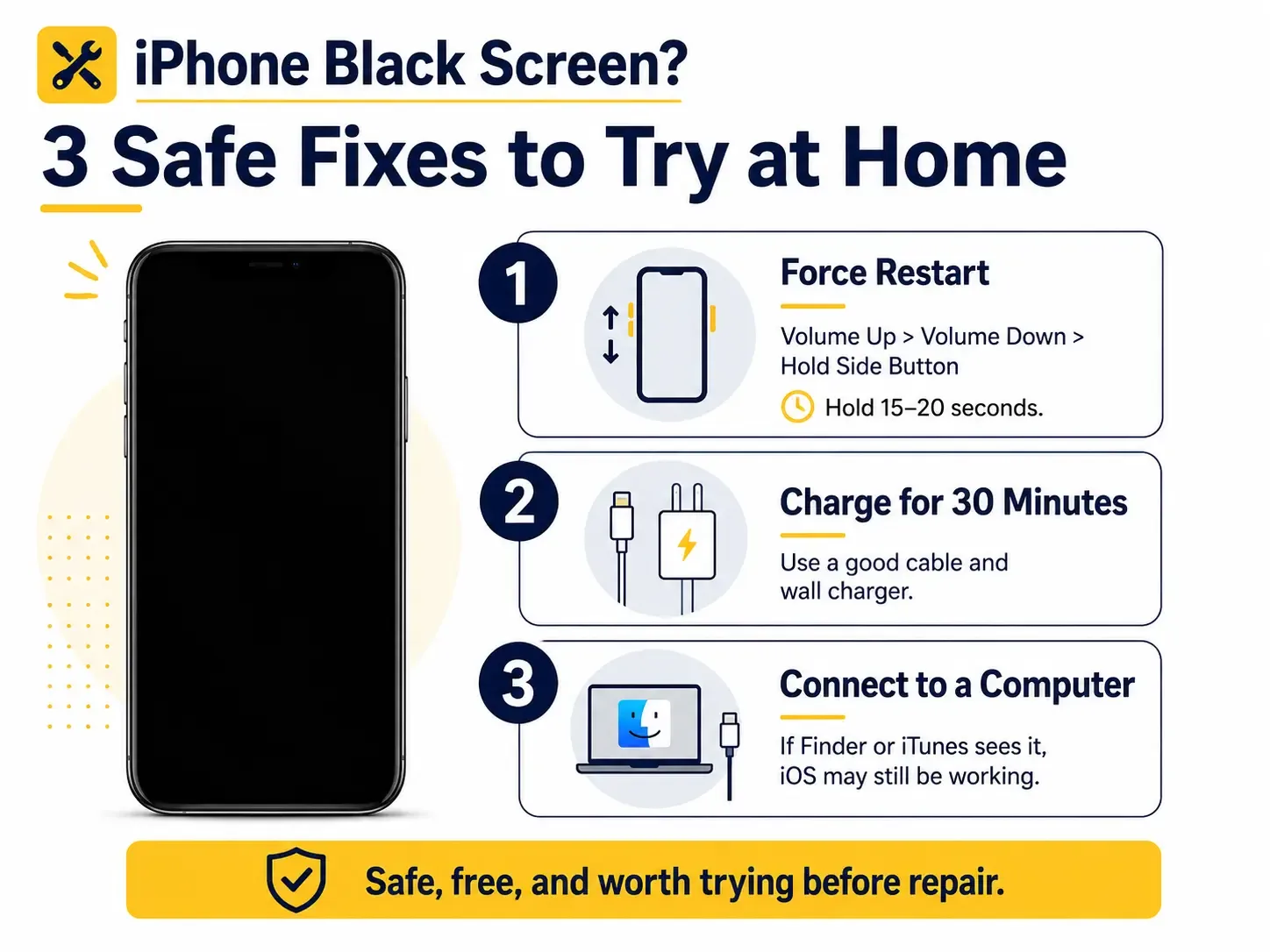
Try these in order. Do not skip ahead.
1. Force restart
This resets the display driver without deleting anything. On iPhone 8 and every model since:
- Press and release Volume Up
- Press and release Volume Down
- Press and hold the Side button and keep holding
Hold it for 15 to 20 seconds, not the 5 you’d normally expect. On a black screen you have no visual feedback, so people let go far too early. If the Apple logo appears, it was a software freeze and you’re done.
Older models: iPhone 7 hold Volume Down + Side together. iPhone 6s and earlier — hold Home + Side together.
2. Charge it properly for 30 minutes
A deeply drained or degraded battery can leave a phone alive enough to vibrate but unable to drive the display backlight. Use a known-good Apple-certified cable and a wall outlet not a laptop port, not a car charger. Leave it for a full 30 minutes, then try the force restart again.
3. Connect it to a computer
Plug into a Mac (Finder) or PC (iTunes / Apple Devices app).
- Computer sees the phone → iOS is alive. You can attempt an Update in recovery mode, which reinstalls iOS without erasing data. Choose Update, never Restore, unless you have a current backup.
- Computer sees nothing → software options are exhausted. This is hardware.
The Flashlight Test: Is the Backlight Dead?
This 10-second test tells you something no software tool can.
Take your iPhone into a dark room. Shine a bright flashlight directly onto the screen at a shallow angle, and look closely.
If you can faintly make out icons, the time, or the lock screen the display is still producing an image and only the backlight has failed. The phone is completely functional behind a dark panel.
If the screen is pure black under direct light the panel itself, the display connector, or the driver circuit has failed.
Either way, this is a repair, not a replacement. And either way your data is untouched.
What’s Actually Broken: The 6 Hardware Causes
When software fixes don’t work, one of these is almost always the reason.
1. The display connector has come loose
Inside your iPhone, the screen attaches to the logic board through small press-fit connectors. A drop, a hard knock, or long-term pressure, a phone wedged in a tight back pocket, for instance, can partially unseat one. The phone keeps running perfectly; the display simply stops receiving a signal.
This is the most common cause of a black screen after a drop where the glass isn’t even cracked, and it’s why “but I didn’t break anything” is such a frequent thing to hear.
2. The backlight circuit has failed
Your display and its backlight are powered by separate circuitry. When the backlight circuit fails, often after liquid exposure or a screen replacement done with the wrong screws the image renders normally but nothing illuminates it. That’s what the flashlight test above detects.
3. The display driver IC has failed
A dedicated chip drives the display. If it fails, the panel goes dark even though it’s physically intact and correctly connected. Important: a shop that only swaps parts will replace your screen, charge you, and hand back a phone that is still black. Diagnosing this before quoting a repair is the difference between a fix and a wasted bill.
4. The OLED panel is internally cracked
Modern iPhone displays can crack inside while the outer glass survives, because the front glass and the OLED layer are separate. A drop can shatter the panel behind perfectly intact glass. Look for dark blotches spreading over hours or days, or a screen that flickers and blacks out when you flex the phone.
5. Liquid corrosion
Water rarely kills an iPhone instantly. It corrodes. Days or weeks after a spill, corrosion can bridge or eat through the pins that carry power to the display, and the screen goes black long after you’d stopped worrying about it. Corrosion spreads this one gets more expensive the longer it’s left, so water damage repair is worth booking early rather than late.
6. A previous cheap screen replacement is failing
This is more common than most people expect. Low-grade aftermarket displays fail early, and they often fail exactly like this: fine for a few months, then intermittent blackouts, then permanently dark. If your iPhone has had its screen replaced before and it’s now black, the replacement part is the first suspect.
Black Screen Right After an iOS Update?
This deserves its own answer, because it’s a genuinely different situation.
If your screen went black during or immediately after an iOS update, with no drop, no water, no prior damage the update likely didn’t finish cleanly. Try, in order:
- Force restart and hold well past the 15-second mark
- Connect to a computer and, if detected, enter recovery mode and choose Update this reinstalls iOS and keeps your data
- Leave it charging for an hour some updates finish processing on a dark screen
If the computer detects the device but the screen stays black after a clean reinstall, the fault is hardware and the update timing was coincidence. That happens more often than people assume: an already-loose display connector finally loses contact during the restart the update forces.
Is My Data Safe?
Yes — in almost every case.
Your photos, messages, contacts and apps live on a storage chip that has nothing to do with the display. A black screen doesn’t touch them. If your iPhone is vibrating and ringing, everything is exactly where you left it.
Two things worth knowing:
- If you’ve been backing up to iCloud, your data is already safe regardless of what happens to the phone.
- If you’ve never backed up, a screen replacement restores access so you can back up properly. That’s usually the first thing we’d recommend doing the moment the new display is on.
The one situation where data is genuinely at risk is severe liquid damage that has reached the logic board. Even then, board-level data recovery can often recover it but time matters enormously, because corrosion doesn’t pause.

What NOT to Do
Don’t open the phone to reseat the connector yourself. This is the single most expensive mistake we see. OLED flex cables are thin and tear easily, and the display connectors need specific tools and a specific angle. Tearing a flex cable turns a straightforward screen replacement into a much larger repair. If your phone is still under manufacturer warranty, opening it also voids that.
Don’t keep force-restarting for an hour. If three attempts haven’t worked, the fourth won’t either.
Don’t restore to factory settings blind. A Restore erases everything. If you can’t see the screen to confirm what you’re agreeing to, and you don’t have a current backup, this is how people lose years of photos to fix a problem that was never software in the first place.
Don’t put it in rice. If liquid is involved, rice does nothing for corrosion already underway inside the phone. Bring it in.
Don’t ignore it because it “still works.” A partially unseated connector and spreading liquid corrosion both get worse, not better.
My CELLTECH repairs are backed by our 90-day warranty and use OEM-quality parts. Most screen replacements are completed while you wait, no appointment needed.
When Apple Is the Better Choice
We’d rather tell you this than have you find out after paying us.
Go to Apple if:
- Your iPhone is still under warranty or covered by AppleCare+ your repair may be free or heavily discounted, and we can’t beat free
- You have an active insurance claim that requires an authorised repair
- Your iPhone is a current-generation Pro model with Face ID hardware that needs factory pairing
Come to us if:
- Your warranty has expired
- You need it back today, not in several days
- Apple has quoted you a price close to the value of the phone
- You want a straight diagnosis before committing to anything
Frequently Asked Questions
Vibration means the logic board has power and iOS is running the failure is confined to the display. The usual causes are a software crash, a display connector loosened by a drop, a dead backlight, or a failed display panel. Force restart first; if that doesn’t work, it needs a technician.
It can almost always be fixed. A black screen on a phone that still vibrates is a display fault, not a device failure. Screen replacement is a routine repair and typically costs a fraction of a new iPhone.
No. Your data is stored on a separate chip and isn’t affected by a display failure. Once the screen is replaced, everything will be exactly as you left it.
Connect the iPhone to a computer. If the computer detects it but the screen stays black after a force restart and an iOS reinstall, it’s hardware. Also try the flashlight test, if you can faintly see icons under a bright light, it’s a backlight fault, which is always hardware.
Force restart and hold past 15 seconds. If that fails, connect to a computer, enter recovery mode, and choose Update not Restore to reinstall iOS without erasing data. If it’s still black afterwards, the fault is hardware.
Display connectors can loosen from ordinary pressure over time, backlight circuits fail with age, and low-quality replacement screens from previous repairs commonly fail this way. Liquid exposure from weeks earlier can also cause corrosion that only reaches the display circuitry later.
If the phone otherwise works well and isn’t more than a few generations old, yes, screen replacement is usually well below the cost of replacing the device, and your data and setup carry over untouched.