Blog
Why Does My iPhone Battery Say Unknown Part and How Can I Fix It?
If your iPhone shows “Unknown Part” next to Battery, it means iOS cannot fully verify the battery installed in the device.
This can happen after a battery replacement, but it does not automatically mean the battery is fake.
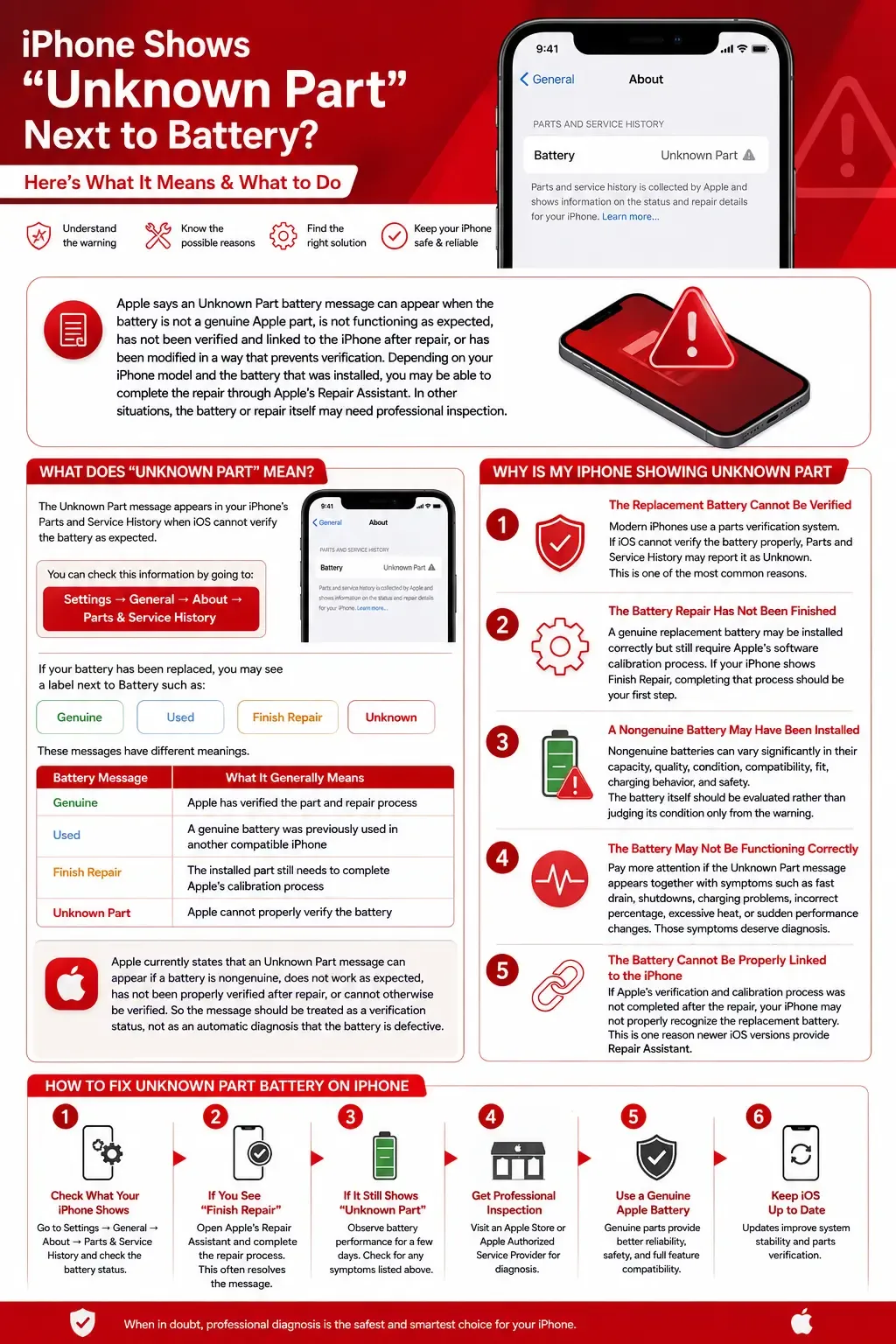
Apple says an Unknown Part battery message can appear when the battery is not a genuine Apple part, is not functioning as expected, has not been verified and linked to the iPhone after repair, or has been modified in a way that prevents verification.
Depending on your iPhone model and the battery that was installed, you may be able to complete the repair through Apple’s Repair Assistant. In other situations, the battery or repair itself may need professional inspection.
Here is how to understand the warning and what to do next.
What Does “Unknown Part” Mean for an iPhone Battery?
The Unknown Part message appears in your iPhone’s Parts and Service History when iOS cannot verify the battery as expected.
You can check this information by going to:
Settings → General → About → Parts & Service History
If your battery has been replaced, you may see a label next to Battery such as:
- Genuine
- Used
- Finish Repair
- Unknown
These messages have different meanings.
| Battery Message | What It Generally Means |
|---|---|
| Genuine | Apple has verified the part and repair process |
| Used | A genuine battery was previously used in another compatible iPhone |
| Finish Repair | The installed part still needs to complete Apple’s calibration process |
| Unknown Part | Apple cannot properly verify the battery |
Apple currently states that an Unknown Part message can appear if a battery is nongenuine, does not work as expected, has not been properly verified after repair, or cannot otherwise be verified.
So the message should be treated as a verification status, not as an automatic diagnosis that the battery is defective.
Why Is My iPhone Showing Unknown Part After Battery Replacement?
Seeing the message immediately after a battery replacement gives you an important clue.
There are several possible explanations.
1. The Replacement Battery Cannot Be Verified
Modern iPhones use a parts verification system.
The phone checks information about certain replacement components, including the battery.
If iOS cannot verify that battery properly, Parts and Service History may report it as Unknown.
This is one of the most common reasons the warning appears after a repair.
2. The Battery Repair Has Not Been Finished
This is especially important on newer supported iPhones.
A genuine replacement battery may be installed correctly but still require Apple’s software calibration process.
In this situation, you may see:
Finish Repair
rather than a completed Genuine status.
Apple’s current Repair Assistant installs calibration information after supported repairs are completed.
If your iPhone shows Finish Repair, completing that process should be your first step before assuming something is wrong with the battery.
3. A Nongenuine Battery May Have Been Installed
The warning can also appear when the installed battery is not recognized as a genuine Apple component.
That does not automatically tell you how well the battery is physically performing.
However, Apple warns that nongenuine batteries can vary significantly in their:
- capacity
- quality
- condition
- compatibility
- fit
- charging behavior
- safety
For this reason, the battery itself should be evaluated rather than judging its condition only from the warning message.
4. The Battery May Not Be Functioning Correctly
An Unknown Part warning is not always about where the battery came from.
Apple also lists a battery that isn’t functioning as expected as one possible reason for the warning.
Pay more attention if the Unknown Part message appears together with symptoms such as:
- unusually fast battery drain
- unexpected shutdowns
- charging problems
- incorrect battery percentage
- excessive heat during normal use
- sudden changes in battery performance
Those symptoms deserve professional diagnosis.
5. The Battery Cannot Be Properly Linked to the iPhone
Replacement components on supported iPhones may need to complete Apple’s verification and calibration process.
If this process was not completed after the repair, your iPhone may not properly recognize the replacement battery.
This is one reason newer versions of iOS provide Repair Assistant.
How to Fix Unknown Part Battery on iPhone
The correct solution depends on what your iPhone actually shows.
Do not immediately assume that another battery replacement is required.
Start by checking the repair status.
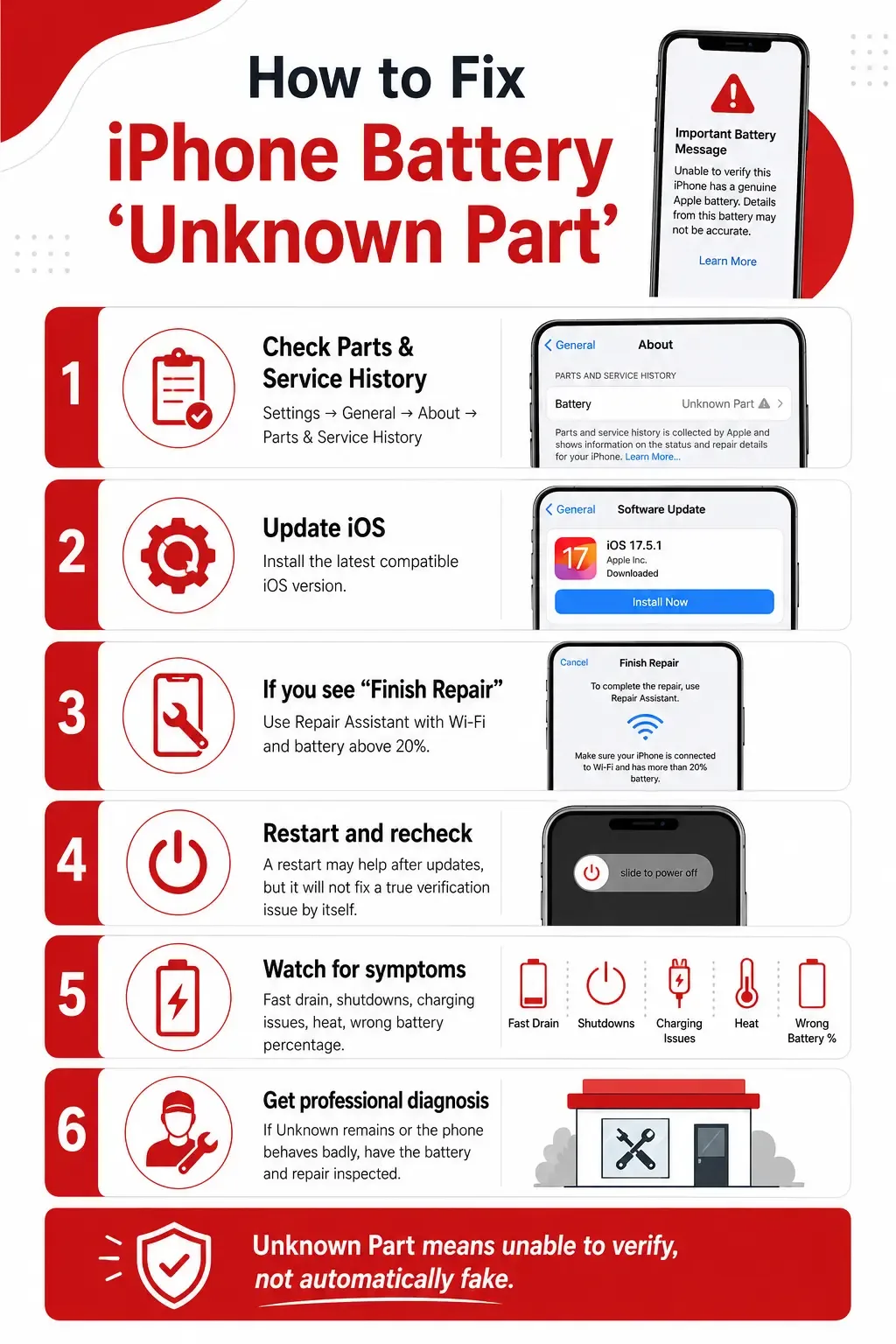
Step 1: Check Parts and Service History
Open:
Settings
Then:
General → About
Look for:
Parts & Service History
Check the label beside Battery.
You may see:
- Genuine
- Used
- Finish Repair
- Unknown
This information determines what you should do next.
If You See “Genuine”
The battery has been recognized through Apple’s verification process.
No Unknown Part repair is required.
If You See “Used”
On supported newer iPhones, this means a genuine battery was previously installed in another compatible iPhone.
It is different from Unknown Part.
If You See “Finish Repair”
Your next step may be Apple’s Repair Assistant.
If You See “Unknown”
The battery cannot currently be verified as expected and may need additional diagnosis.
Step 2: Update Your iPhone
If a repair was recently performed, make sure your iPhone is running the latest compatible version of iOS.
Software updates can include improvements related to:
- repair calibration
- Parts and Service History
- component recognition
- Repair Assistant
After updating, restart the device and check:
Settings → General → About → Parts & Service History
again.
If Finish Repair is available, continue to the next step.
Step 3: Use Repair Assistant If “Finish Repair” Appears
Apple now provides a built-in tool called Repair Assistant for supported repairs.
Before beginning, Apple currently requires:
- the latest compatible version of iOS
- a Wi-Fi internet connection
- more than 20% battery charge
Then go to:
Settings → General → About → Parts & Service History
If available, select:
Restart & Finish Repair
Then follow the instructions displayed on your iPhone.
Repair Assistant installs the necessary calibration information to complete supported repairs.
Which iPhones Support Repair Assistant for Battery Repairs?
According to Apple’s current documentation, battery repair completion through Repair Assistant is supported on:
- iPhone 12 series
- iPhone 13 series
- iPhone 14 series
- iPhone 15 series
- iPhone 16 and later supported models
- iPhone SE (3rd generation)
Support and available options can vary by model and software version.
If your iPhone does not provide the Repair Assistant option, do not assume you can force it to appear.
What If Repair Assistant Does Not Fix the Unknown Part Message?
If the process cannot be completed, first check the basic requirements.
Make sure:
- Wi-Fi is connected
- iOS is updated
- the battery level is above 20%
- the iPhone has been restarted
Then check Parts and Service History again.
If another repair provider installed the battery and the repair cannot be completed, contact that repair provider.
The issue may require the battery itself, its installation, or its compatibility with the iPhone to be inspected.
Can Restarting an iPhone Remove the Unknown Battery Message?
Sometimes restarting an iPhone is useful after:
- an iOS update
- an incomplete repair process
- a temporary system problem
However, restarting does not normally solve a genuine battery verification problem by itself.
If the underlying battery cannot be verified, the Unknown Part status can remain.
Therefore:
Restart = useful troubleshooting step
but
Restart ≠ guaranteed Unknown Part fix
Does Updating iOS Remove the Unknown Part Message?
Not necessarily.
Updating iOS is useful because Repair Assistant requires current software and Apple may improve repair-related functionality through updates.
But an update cannot turn an incompatible or unverifiable battery into a verified part.
If the battery itself is the reason for the warning, additional service may still be required.
Can I Remove the iPhone Unknown Part Battery Warning Manually?
There is no normal Settings toggle that simply turns the verification status off.
Some repair guides on the internet discuss modifying battery electronics or transferring battery management components.
These procedures involve working directly with a lithium-ion battery and sensitive internal components and should be left to properly trained repair professionals.
Opening, modifying, puncturing, overheating, or incorrectly handling an iPhone battery can create a serious safety risk.
For normal users, the safer path is:
Check repair history → update iOS → use Repair Assistant when available → have the battery professionally inspected if the warning remains.
Is an Unknown Part Battery Dangerous?
The words Unknown Part alone do not prove that the battery is dangerous.
They mean Apple cannot verify the component as expected.
However, you should distinguish the software warning from actual battery symptoms.
Seek professional service promptly if you notice:
- unusual heat during normal use
- rapid battery drain
- unexpected shutdowns
- charging problems
- physical changes to the device
- the screen or back of the iPhone beginning to lift
Do not continue attempting software fixes when the device is showing physical battery-related symptoms.
Can I Still Use My iPhone With an Unknown Part Battery?
Apple says these verification messages by themselves do not necessarily prevent you from using the iPhone or battery.
However, some battery information may not be accurate when the battery cannot be verified.
For example, Battery Health information may be unavailable or unreliable.
That is why you should evaluate both:
the warning
and
how the iPhone is actually behaving.
An iPhone that operates normally with a verification message is different from one that is:
- shutting down unexpectedly
- overheating
- draining extremely quickly
- refusing to charge
Why Is Battery Health Not Showing After Battery Replacement?
This is another common search related to the Unknown Part message.
Apple explains that when an iPhone cannot verify its battery, Battery Health information may not be accurate.
You might see a message similar to:
Unable to verify this iPhone has a genuine Apple battery.
Instead of relying only on the Battery Health percentage, have the replacement checked if you experience real battery-performance problems.
Does Unknown Part Mean My iPhone Battery Is Fake?
Not necessarily.
This is one of the biggest misconceptions about the warning.
Apple lists several possible reasons for an Unknown Part battery:
- The battery isn’t a genuine Apple part
- The battery isn’t functioning as expected
- The repair hasn’t been properly verified and linked
- The component has been modified or otherwise cannot be verified
So:
Unknown Part means “unable to verify,” not automatically “fake battery.”
That distinction makes this message much easier to understand.
What Does “Unable to Verify This iPhone Has a Genuine Apple Battery” Mean?
This message is closely related to the Unknown Part status.
It means iOS cannot verify the installed battery through Apple’s normal verification system.
When this happens, Battery Health reporting may not be accurate.
If the message appeared immediately after a recent repair, contact the repair provider and ask:
- what battery was installed
- whether the repair was fully completed
- whether the part should support Apple’s calibration process
- whether additional service is required
A reputable repair provider should be able to explain what was installed and what the warning means for your specific iPhone.
Unknown Part vs Used Battery: What Is the Difference?
These messages should not be confused.
Unknown Part
The battery could not be properly verified.
Used
On supported newer iPhones, Apple can identify that a genuine component was previously installed in another iPhone.
A Used status does not mean the same thing as Unknown.
This distinction is particularly useful when buying a pre-owned iPhone.
Should I Buy an iPhone That Shows Unknown Part for the Battery?
Be more careful before purchasing it.
The message suggests that the iPhone has had battery-related service or that iOS cannot properly verify the component.
Before buying, check:
Settings → General → About → Parts & Service History
Then ask the seller:
- Was the battery replaced?
- Who performed the repair?
- When was it replaced?
- Is there a repair receipt?
- Is there a repair warranty?
- Does the phone charge normally?
- Does it shut down unexpectedly?
Also test normal battery performance instead of relying solely on a displayed battery percentage.
An Unknown Part status may also affect the device’s resale or trade-in considerations.
Should I Replace the Battery Again?
Not automatically.
Replacing the battery without diagnosing the cause can waste money and may not address the underlying verification issue.
A technician should first determine:
- what battery is currently installed
- whether the battery itself is working correctly
- whether the repair was completed properly
- whether your iPhone supports Repair Assistant
- whether another battery-related fault is present
The correct solution depends on the diagnosis.
When Should You Get Professional iPhone Battery Service?
Professional battery diagnosis makes sense when:
- Unknown Part appeared after a recent battery replacement
- Battery Health disappeared
- Repair Assistant cannot complete the repair
- the iPhone drains much faster than expected
- charging has become unreliable
- the phone shuts down unexpectedly
- the device becomes unusually hot
- you do not know who previously repaired the iPhone
This is especially important for used iPhones where the repair history is unclear.
How CELLTECH Can Help With an iPhone Unknown Battery Message
An Unknown Part message can be confusing because it does not tell you exactly what is physically wrong with the device.
CELLTECH technicians can inspect the iPhone and determine whether you are dealing with:
- a battery verification issue
- an aging battery
- a poorly performing replacement
- an incomplete battery repair
- charging-related problems
- another power issue
CELLTECH already provides professional battery replacement and diagnostic services for smartphones and other devices.
Instead of replacing components without knowing the cause, the device can be checked first so the appropriate repair can be recommended.
Frequently Asked Questions
First check Settings → General → About → Parts & Service History. If you see Finish Repair on a supported iPhone, update iOS, connect to Wi-Fi, ensure the battery is above 20%, and use Apple’s Repair Assistant. If the battery continues to show Unknown, have the previous repair and battery professionally inspected.
The replacement may not be recognized through Apple’s verification system, the repair may not have been completed and calibrated, the battery may be nongenuine, or the battery may not be functioning as expected.
An Unknown Part message is fundamentally a verification status. A component that has not completed the required verification or calibration process may not be recognized as expected even if the situation is more complicated than simply “genuine versus fake.”
Do not rely on it disappearing automatically. If the underlying verification issue remains, the status may continue to appear in Parts and Service History.
There is no ordinary user setting designed simply to change an unverifiable battery into a verified component. The repair or verification issue itself should be addressed.
A factory reset is not an appropriate first solution for a component verification issue. Check Parts and Service History and Repair Assistant first.
The message itself does not necessarily prevent the iPhone from operating or charging. However, the actual battery should be inspected if you also have charging, heat, shutdown, or battery-drain problems.
If iOS cannot verify the battery, Battery Health information may be unavailable or inaccurate.
They are related battery-verification messages. The exact wording varies depending on the iPhone model and iOS version.
Finish Repair means the replacement part still needs Apple’s calibration process to complete the repair. On supported devices, Repair Assistant can perform that process.
Get Your iPhone Battery Checked at CELLTECH
If your iPhone displays Unknown Part, Battery Not Recognized, or Unable to Verify This iPhone Has a Genuine Apple Battery, do not immediately assume your iPhone is damaged beyond repair.
First check the device’s Parts and Service History.
If Finish Repair appears, use Apple’s supported Repair Assistant process.
If the battery remains Unknown, Battery Health is unavailable, or your iPhone is also experiencing poor battery life, shutdowns, charging problems, or unusual heat, the next step is a professional diagnosis.
Visit CELLTECH to have your iPhone battery and power system inspected and determine the right repair for your device.